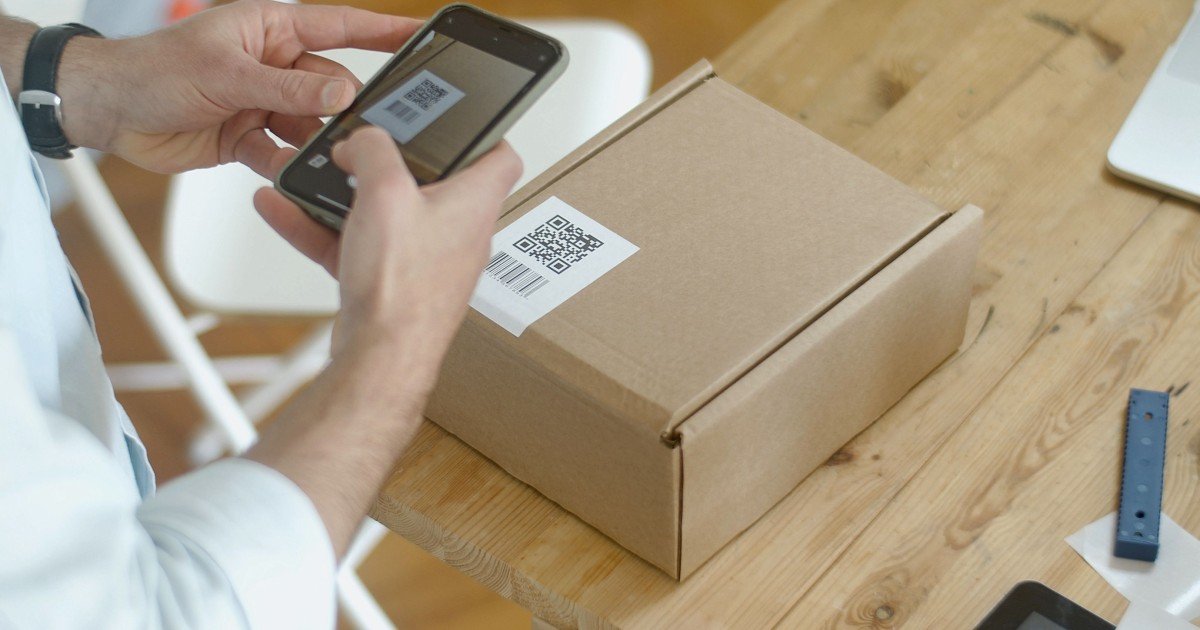
You have probably scanned a QR code without giving much thought to what is happening behind those tiny black and white squares. Yet the answer to how do QR codes store and transfer information involves a clever combination of data encoding, mathematical error correction, visual patterns, and camera-based decoding. A QR code does not magically “contain a website.” It stores encoded data in a machine-readable two-dimensional pattern, and your phone converts that pattern back into usable information.
That information might be a website address, contact details, payment data, text, a Wi-Fi configuration, a product identifier, or another type of digital content. Once the code is scanned, the reader interprets its visual structure, reconstructs the encoded data, and passes the result to an appropriate application.
The technology may look simple from the outside, but the design is surprisingly sophisticated. QR codes can remain readable even when part of the printed symbol is dirty or damaged, and they can be scanned from different orientations. The original QR Code specification was developed by DENSO WAVE and later standardized internationally under ISO/IEC 18004.
So, what exactly is happening inside that square?
What Is a QR Code?
QR stands for Quick Response. A QR code is a two-dimensional barcode designed to represent digital information using a grid of small squares called modules.
Traditional one-dimensional barcodes primarily represent information along a single direction. QR codes use both horizontal and vertical dimensions, allowing considerably more information to be represented in a relatively compact area. DENSO WAVE’s specification describes QR Code symbols ranging from Version 1 at 21 × 21 modules to Version 40 at 177 × 177 modules.
The important thing to understand is that the black and white pattern is not simply a visual picture of letters or numbers.
Instead, the QR code contains structured binary information.
At a simplified level, the process looks like this:
Information → Encoding → Error Correction → QR Pattern → Camera Scan → Decoding → Original Information
For example, imagine a business wants a QR code that opens:
The QR generator does not print those characters directly into the square. It converts the information into an appropriate encoded representation, adds the structural information required by the QR standard, applies error-correction data, and arranges the resulting bits into the QR symbol.
When someone scans it, the process runs in reverse.
The scanner recognizes the QR pattern, determines its orientation, reads the modules, corrects errors where possible, reconstructs the encoded data, and interprets the result.
That is why a QR code is better understood as a visual data container rather than simply a fancy barcode.
How Do QR Codes Store Information?
The simplest answer is: QR codes store information by representing encoded data as patterns of dark and light modules in a two-dimensional grid.
But there is more going on than simply turning letters into black squares.
Data Is Converted Into Encoded Bits
When you create a QR code, the original information has to be converted into a form the QR system can represent.
QR Code supports several encoding modes, including numeric, alphanumeric, byte-oriented binary data, and Kanji. The appropriate mode depends on the content being stored.
For example, a string containing only digits can be encoded differently from a sentence containing letters, punctuation, and other characters.
This matters because efficient encoding can allow more information to fit inside the same QR symbol.
The encoded data is ultimately represented as binary information. In simplified terms, the reader is looking at a pattern that corresponds to sequences of bits.
The QR Code Is Divided Into Modules
The small black and white squares you see are called modules.
A QR code consists of a grid of these modules. Some modules represent data, while others have specific structural functions that help the scanner understand the symbol.
As the amount of information increases, a larger QR Code version may be required. There are 40 standard QR Code versions, with the grid increasing by four modules per side between successive versions.
This explains why a QR code containing a short URL may look relatively simple, while a code containing substantially more information can appear much denser.
QR Codes Do Not All Have the Same Capacity
There is no single fixed amount of information that every QR code can store.
Capacity depends on several factors, including:
- QR Code version
- Type of data
- Character set or encoding mode
- Error-correction level
- Available symbol space
Under the standard specifications, a Version 40 QR Code can encode up to 7,089 numeric characters or up to 2,953 bytes of binary data under the relevant maximum-capacity conditions.
That does not mean you should routinely put thousands of characters into a QR code.
As data increases, the symbol becomes denser and can become more difficult to scan reliably, particularly when printed small or viewed under poor conditions.
The Hidden Structure Inside a QR Code
If you look closely at a QR code, you will notice that not every black or white square represents the message itself.
Several visual elements help the scanner understand the symbol.
Finder Patterns
The three large square patterns near three corners are among the most recognizable parts of a QR code.
They are called position detection patterns, or finder patterns.
Their purpose is to help the reader determine where the QR code is and how it is oriented. This is one reason QR codes can generally be scanned without carefully aligning them to a particular direction.
DENSO WAVE notes that these position detection patterns support high-speed, 360-degree reading.
This is a major practical advantage over many traditional barcode designs.
Alignment Patterns
Larger QR codes can also contain smaller alignment patterns.
These help the scanner compensate for distortion and determine the geometry of the symbol, particularly when the code is photographed at an angle or printed across a surface that is not perfectly flat.
Timing Patterns
Timing patterns help establish the grid structure between the major positioning elements.
In simple terms, they help the reader determine where the individual modules belong.
Quiet Zone
There is also an important empty area surrounding the QR code called the quiet zone.
This margin helps the scanner distinguish the QR symbol from its surroundings. DENSO WAVE specifies a four-module-wide margin around a standard QR Code symbol.
This is why placing a QR code directly against a busy image, border, or neighboring graphic can cause scanning problems.
The empty space is not wasted design space. It is part of making the code recognizable.
How Does a QR Code Transfer Information to Your Phone?
This is where the wording can be slightly misleading.
A printed QR code does not normally “transmit” information wirelessly like Wi-Fi or Bluetooth.
Instead, the QR code presents encoded information visually, and the camera captures that information.
The transfer happens through the interaction between the printed or displayed symbol and the scanning device.
Here is the basic process.
Step 1: The Camera Captures the QR Code
Your phone’s camera observes the QR code as an image.
The software does not need to understand the meaning of the information yet. Its first job is to locate and recognize the QR structure.
Step 2: The Scanner Finds the QR Pattern
The software analyzes the image and looks for recognizable QR features, especially the finder patterns.
Once it identifies the symbol, it can determine its position, orientation, and approximate geometry.
Step 3: The Image Is Corrected
Real-world QR codes are rarely scanned under perfect laboratory conditions.
The code may be:
- Tilted
- Curved
- Slightly blurred
- Printed at an angle
- Shown on a reflective screen
- Partially damaged
- Viewed in uneven lighting
The scanning software processes the captured image to compensate for these conditions as much as possible.
Step 4: The Modules Are Read
Once the software establishes the QR grid, it interprets the dark and light modules.
The reader then reconstructs the underlying encoded information.
Step 5: Error Correction Is Applied
This is one of the most impressive features of QR technology.
A QR code includes additional information that can help recover data when some of the symbol is damaged or unreadable.
Step 6: The Data Is Decoded
After the data has been reconstructed and corrected, the scanner interprets its format.
If the result is a URL, your phone may offer to open it in a browser.
If it is contact information, the phone may recognize it as a contact.
If it contains plain text, the text can simply be displayed.
The QR code itself has completed its job at this point: it has provided the encoded information to the scanning system.
Why Can QR Codes Still Work When They Are Damaged?
One of the most useful QR Code features is error correction.
Imagine a QR code printed on a package. Over time, part of the label could become scratched, dirty, faded, or covered.
If every single module were essential with no redundancy, even a small defect could make the entire code unreadable.
QR codes solve this problem by adding error-correction information using Reed-Solomon error correction.
There are four standard error-correction levels:
- Level L: approximately 7% restoration capability
- Level M: approximately 15%
- Level Q: approximately 25%
- Level H: approximately 30%
These percentages describe the approximate number of codewords that can be restored under the standard error-correction model; they should not be interpreted as a guarantee that any QR code with that percentage of physical damage will always scan successfully.
Higher error correction generally means more redundancy and therefore less room for the original data.
That creates an important design trade-off:
More error correction = greater resilience, but potentially a larger or denser QR code.
For a clean indoor environment, a lower level may be adequate. For labels exposed to dirt, wear, or industrial conditions, stronger error correction can be useful.
What Information Can a QR Code Store?
A QR code can represent many types of information.
Common examples include:
- Website URLs
- Plain text
- Telephone numbers
- Email addresses
- Contact information
- Wi-Fi configuration details
- Calendar-related information
- Product and inventory data
- Location information
- Payment-related data
- Authentication or identification information
- Binary data
The key distinction is that a QR code can store data, while the application receiving that data determines what the data means.
For instance, a QR code containing a URL is not itself a website.
It is simply storing the URL.
Your phone recognizes the URL format and gives you an option to open it.
This distinction becomes especially important when discussing QR-based payments, digital menus, tickets, and authentication systems. The QR code is often only one component of a larger system.
Can a QR Code Store an Image?
Technically, QR Code can store binary data, which means an image or sound can theoretically be represented as binary information.
However, practical capacity is limited. DENSO WAVE notes that the maximum binary capacity is only on the order of a few kilobytes under maximum-capacity conditions, making ordinary images or audio impractical to store directly in most QR scanning situations.
That is why a QR code that appears to “open an image” usually stores a reference such as a URL rather than containing the complete high-resolution image.
This is a useful rule of thumb:
The QR code often stores the address to information rather than the entire information resource itself.
Static QR Codes vs Dynamic QR Codes
People often hear the terms static QR code and dynamic QR code, but these describe how the information is managed rather than two completely different scanning technologies.
Static QR Codes
A static QR code generally contains the destination information directly.
If you encode a URL into the symbol, that URL is part of the QR data.
If you later want the code to point somewhere else, you normally need to generate a new QR code.
Static codes can be useful when the underlying information is unlikely to change.
Dynamic QR Codes
A dynamic QR code often contains a URL that points to an intermediary service or controlled destination.
The QR symbol itself may remain unchanged while the destination associated with that URL can be modified on the server side.
For example:
QR code → short URL → current destination
This allows organizations to update the destination without reprinting every physical QR code.
The important point is that the QR code has not necessarily become remotely editable. Rather, the data encoded in it may point to a service whose response can change.
That distinction helps explain why two visually similar QR codes can behave very differently over time.
How QR Codes Are Used in the Real World
QR codes have moved far beyond simple website links.
You now encounter them in many everyday situations.
Payments
Payment systems can use QR codes to represent information required to initiate or identify a transaction.
Depending on the payment system, the code may contain payment-related identifiers, a merchant reference, amount information, or a URL that connects the user with the payment service.
The QR code is therefore acting as a convenient machine-readable bridge between a physical display and a digital transaction system.
Product Packaging
Manufacturers can use QR codes to connect physical products with digital information.
A package might provide access to:
- Product instructions
- Ingredient or specification information
- Warranty details
- Registration pages
- Authenticity resources
- Support information
Event Tickets
Digital tickets can contain QR codes that represent ticket or session information.
At the entrance, a scanner reads the code and the associated ticketing system determines whether the ticket is valid.
Again, the QR code is not necessarily the complete ticket database. It can serve as a machine-readable identifier that connects the physical or digital ticket to the larger system.
Wi-Fi Sharing
A QR code can contain Wi-Fi configuration information, allowing a compatible device to interpret network details without requiring someone to manually type a long password.
Marketing and Printed Media
Businesses can use QR codes to connect posters, packaging, menus, brochures, and signs with digital experiences.
This creates an important bridge between physical and online environments.
That bridge is becoming even more interesting as AI-powered applications and automated digital workflows become more common. For readers interested in how software systems can move beyond simply responding to information and instead perform multi-step actions, our guide on What Is Agentic AI and How AI Agents Work explores that broader shift.
QR Codes, Security, and Privacy
A QR code can be useful, but scanning one should not automatically be treated as a sign that a destination is trustworthy.
The code is simply carrying data.
That data can point to a legitimate website, an unexpected destination, or a malicious site.
For that reason, users should pay attention to what happens after scanning.
Before opening an unfamiliar destination, check:
- What URL is being offered?
- Does the domain look correct?
- Is the request asking for sensitive information?
- Does the page unexpectedly request a login?
- Is the QR code placed somewhere it could have been replaced or covered?
- Is the requested action appropriate for the situation?
A QR code itself is not inherently secure or insecure.
Its security depends on the information encoded, the system behind it, and what the user does after scanning.
Organizations should also consider privacy when designing QR-based experiences. A QR code can make it easier to connect physical interactions with online systems, but that convenience should not come at the expense of unnecessary data collection.
Why Some QR Codes Do Not Scan Properly
When a QR code refuses to scan, the problem is not always the phone.
The most common practical issues include:
- Insufficient contrast
- Very small modules
- Missing quiet zone
- Excessive visual decoration
- Low-quality printing
- Distortion
- Glare
- Poor lighting
- Excessive data density
- Physical damage
- Incorrect sizing
A QR code needs enough visual separation for the reader to identify its structure.
This is why a heavily customized QR design can look attractive while performing poorly.
A good QR code is not merely one that looks creative.
It is one that remains reliably readable in the environment where people will actually use it.
For printed applications, the symbol’s physical size, module size, printing quality, surrounding margin, and scanning distance all matter. DENSO WAVE specifically emphasizes maintaining the required quiet zone around the symbol.
Do QR Codes Need the Internet to Work?
Not necessarily.
A QR code can be scanned without an internet connection if the scanner only needs to decode locally stored information.
For example, a QR code containing plain text does not inherently require internet access to reveal that text.
However, an internet connection is required if the decoded information points to an online resource that needs to be accessed.
This distinction is important:
Scanning the QR code and using the information obtained from it are separate steps.
Your phone can decode the symbol locally, but the destination may still require an internet connection.
Can QR Codes Store Sensitive Information?
Technically, they can store data that is sensitive.
But that does not automatically make it a good idea.
A QR code displayed publicly can be photographed, copied, or shared. If the encoded information itself contains something that should remain confidential, putting it into a publicly accessible QR code can create obvious risks.
A safer design is often to encode a non-sensitive identifier or controlled URL and keep sensitive information on a protected system.
This is especially relevant for authentication, access control, identity-related workflows, and payment systems.
The guiding principle is simple:
Do not assume that a QR code is private merely because humans cannot easily read its contents.
A QR scanner can decode it.
How QR Codes Compare With Traditional Barcodes
The most obvious difference is dimensionality.
Traditional one-dimensional barcodes encode information primarily across one direction. QR codes use a two-dimensional grid.
This allows QR codes to hold substantially more information in a compact area. DENSO WAVE notes that QR Code can encode several dozen to several hundred times more information than conventional barcodes depending on the comparison and data type.
QR codes also offer several practical advantages:
| Feature | Traditional Barcode | QR Code |
|---|---|---|
| Data layout | Mostly one-dimensional | Two-dimensional |
| Data capacity | Generally lower | Generally higher |
| Orientation | More constrained | Designed for 360-degree reading |
| Error correction | Depends on barcode system | Built into QR Code |
| Typical use | Product identification | Links, payments, tickets, text, connectivity, and more |
| Smartphone scanning | Possible with compatible apps | Widely supported |
Neither technology is universally better.
A retail inventory system may have different requirements from a restaurant menu, event ticket, or payment application.
The right choice depends on the amount of information, physical environment, scanning equipment, and workflow.
How QR Codes Fit Into Modern Digital Experiences
QR codes are interesting because they solve a very specific problem: connecting the physical world to digital information with minimal friction.
A printed poster cannot directly execute a web request.
A product package cannot update its own content.
A paper ticket cannot communicate with a digital database by itself.
A QR code provides a machine-readable bridge.
This becomes even more relevant as digital systems become more automated.
For example, an ordinary QR code may simply take a user to a webpage. A more advanced digital workflow could use that interaction to trigger an application, retrieve information, verify an identifier, or begin a multi-step process.
That does not mean QR codes themselves are becoming intelligent.
The intelligence exists in the software connected to them.
This distinction is similar to the difference between an AI chatbot and an AI agent. A chatbot may primarily respond to a user’s request, while an agentic system can potentially use tools, evaluate results, and perform multiple steps toward a goal. You can explore that distinction in our guide to AI Agents vs Chatbots: What Is the Difference?.
The QR code can act as the starting point that connects a physical interaction to such a digital workflow.
A Simple Mental Model for Understanding QR Codes
If the technical details feel complicated, remember this four-step model:
1. Encode
The original information is converted into a machine-readable representation.
2. Arrange
That information, together with structural and error-correction data, is arranged into QR modules.
3. Scan
A camera captures the visual pattern and QR software identifies its structure.
4. Decode
The software reconstructs the information and passes it to the appropriate application.
That is essentially how a QR code stores and transfers information.
The impressive part is not that a phone can “see” black and white squares.
The impressive part is that those squares have been organized according to a standardized system that allows software to reliably reconstruct digital information from a physical or displayed image.
Frequently Asked Questions
How much information can a QR code store?
Capacity depends on the QR Code version, data type, and error-correction level. Standard QR Code supports 40 versions, ranging from 21 × 21 modules to 177 × 177 modules. Under maximum conditions, a Version 40 symbol can represent up to 7,089 numeric characters or 2,953 bytes of binary data.
Do QR codes store the actual website?
If a QR code contains a URL, the URL itself is encoded in the QR data. The QR code does not normally contain the entire website. Your device decodes the URL and then accesses the website if an internet connection is available.
How does a phone read a QR code?
The camera captures an image of the QR code. Scanning software identifies the QR structure, determines its orientation, reads the modules, applies error correction, decodes the data, and presents the result to the appropriate application.
Can a QR code work if part of it is damaged?
Yes, within limits. QR Code includes Reed-Solomon error correction, with four correction levels ranging from L to H. Higher levels provide greater recovery capability but require additional redundancy.
Why are QR codes square?
The square grid provides a two-dimensional structure in which information can be arranged horizontally and vertically. The standardized geometry also gives scanners recognizable positioning and timing features.
Can QR codes store passwords?
They can encode text or other data that may include a password, but publicly displaying sensitive credentials is generally a poor security practice. Anyone who can access the QR code may be able to decode its contents.
Do QR codes work without internet?
The decoding process can work without internet access. Whether the resulting information is useful offline depends on what the QR code contains. Plain text can be read locally, while an online URL requires connectivity to access the destination.
Can a QR code contain an image?
Binary data can technically be encoded, but QR Code capacity is limited. Storing ordinary images directly is generally impractical, so QR codes commonly store a URL or identifier that points to an image hosted elsewhere.
What is the difference between a static and dynamic QR code?
A static QR code generally contains its destination information directly. A dynamic QR code commonly points to a URL or service whose destination can be changed without changing the printed QR symbol. The exact implementation depends on the service being used.
Why does my QR code not scan?
Check the code’s size, contrast, quiet zone, printing quality, lighting, surface distortion, and physical damage. Decorative changes can also interfere with the patterns that scanners need to recognize.
Are QR codes secure?
The QR format itself is a data representation technology, not a guarantee of security. A QR code can direct users to safe or unsafe destinations. Always inspect unfamiliar destinations before providing sensitive information or approving an important action.
QR Codes Are Small Data Bridges With Clever Engineering
So, how do QR codes store and transfer information?
They convert information into encoded digital data, add structural and error-correction information, and represent the resulting data as a two-dimensional pattern of modules. A camera then captures that pattern, QR software identifies its structure, reads the modules, corrects errors where possible, and decodes the original information.
What looks like a random collection of black and white squares is actually a carefully organized data structure.
Its strength comes from several ideas working together: two-dimensional data storage, standardized positioning patterns, multiple encoding modes, configurable error correction, and fast visual recognition.
The result is a technology that can connect a printed page, product, ticket, sign, package, screen, or physical location with digital information in seconds.
And that is perhaps the most useful way to think about QR codes in 2026: they are not the destination. They are a compact bridge between something physical and something digital.
As digital experiences become increasingly connected to automated software, AI systems, payment platforms, identity services, and online databases, that bridge remains remarkably useful. The QR code itself may be simple, but the systems it can connect to are becoming much more sophisticated.
Informational Disclaimer: This article is provided for general educational and informational purposes only. QR Code implementations, security practices, payment systems, and software behavior can vary by provider and application. Always verify important information and use trusted systems when handling sensitive data or transactions.





Leave a Reply